We have begun the founding chapter. Be among the first

Email spoofing and business email compromise | Questions and answers

Email spoofing, and how to know who really sent an email

Email spoofing is an email that pretends to come from someone it did not. It is how most business email compromise starts, and Americans reported $3.05 billion in losses from it to the FBI in 2025. Here is how to check any email in a minute, what SPF, DKIM and DMARC can and cannot catch, and how the Trust Identity Protocol (TIP) by The AI Lab lets a verified person sign an email so you can confirm it came from them.

Key facts

$3.05 billion
lost to business email compromise in the United States in 2025, across 24,768 complaints to the FBI. FBI IC3, 2025 Internet Crime Report
$55.5 billion
in exposed losses to business email compromise worldwide from October 2013 to December 2023, including attempted losses. FBI IC3 PSA, Business Email Compromise, the $55 Billion Scam, Sept. 2024
191,561
phishing and spoofing complaints made to the FBI in 2025. FBI IC3, 2025 Internet Crime Report
$679 million
frozen by the FBI in 2025 for victims who reported fraudulent transfers quickly, 58% of the money at risk. FBI IC3, 2025 Internet Crime Report
Not covered
lookalike domains and fake display names are outside what DMARC was designed to stop, in the words of its own standard. RFC 7489, DMARC, sections 2.2 and 2.4
7.7%
of the 1.8 million busiest email domains enforce DMARC at p=reject, the setting that blocks forged mail. EasyDMARC, 2025 DMARC adoption report (vendor study)

The four ways an email lies, and what catches each

SPF, DKIM and DMARC prove which domain and which server sent an email. They were never designed to prove which person wrote it. That gap is where most large losses happen.

TrickWhat you seeSPF, DKIM and DMARCA TIP signature
Forged domainThe From line shows the real address, [email protected], but the mail came from somewhere else.Stopped when the domain publishes DMARC at p=reject. Many domains do not.The email carries no valid signature from that person.
Lookalike domainOne letter is off, rn for m, a hyphen added, .co for .com. The attacker owns the domain and sets up SPF and DKIM for it.Passes SPF, DKIM and DMARC, because the attacker controls that domain.A TIP signature belongs to a verified person, not to a domain. A lookalike domain cannot produce it.
Fake display nameThe name says your CEO or your supplier. The address behind it is a free webmail account.Passes authentication for the free account's own domain."Signed by" shows the signer's verified name. An impostor's email has no signature, or one in their own real name.
Hacked real mailboxThe email really comes from your supplier's account, often inside a real thread, with new bank details.Passes everything, because it is sent from the real mailbox.A stolen password is not enough to sign. Every signature needs the owner's fresh face or fingerprint check on their own device.

SourcesRFC 7489, DMARC, sections 2.2 and 2.4CISA, Binding Operational Directive 18-01

Check any email in a minute

These checks work in any mail app, with or without TIP.

  1. Read the address, not the name

    Tap or hover on the sender's name to see the full address. Look for one changed letter, an extra word, a different ending such as .co instead of .com, or a free webmail address on a business email.

  2. Look for your mail app's warning

    Gmail shows a question mark beside the sender's name when it cannot confirm the message came from the domain it claims. More, then Show original, lists the SPF, DKIM and DMARC results. Outlook shows similar results under View message details.

  3. Check where a reply would go

    Press Reply and look at the address it fills in. A reply address that differs from the sender's is a common sign of fraud.

  4. Confirm any money request another way

    Treat a new bank account, a changed wiring instruction or an urgent payment as unconfirmed until you call the person on a number you already had. Never use a phone number or link from the email itself.

  5. If it is signed with TIP, open the record

    A signed email ends with "Signed with TIP" and a Verify link. Open the link to see who signed it and when, then use Verify content on that page to check the subject, message, sender, recipients and attachments on your own device.

  6. If you already paid, act within hours

    Call your bank and ask it to recall the transfer, then report it. In the United States, file at ic3.gov. Elsewhere, use your national police cybercrime service. Speed matters. The FBI froze 58% of the money at risk in the cases reported to it in 2025.

How TIP email signing works

A verified person signs an email in the webmail they already use. The people who receive it can check who signed it, that it was sent to them, and that nothing changed. The email's words and addresses are never published.

01

Sign it next to Send

Write your email as usual in Gmail, Outlook, Yahoo Mail, AOL Mail, iCloud Mail, Proton Mail, Zoho Mail or Fastmail, and press Sign with TIP. A fresh face or fingerprint check on your own device unlocks your key for that one signature.

A webmail compose toolbar with the Sign with TIP button beside the Send button

02

Your recipient sees who signed it

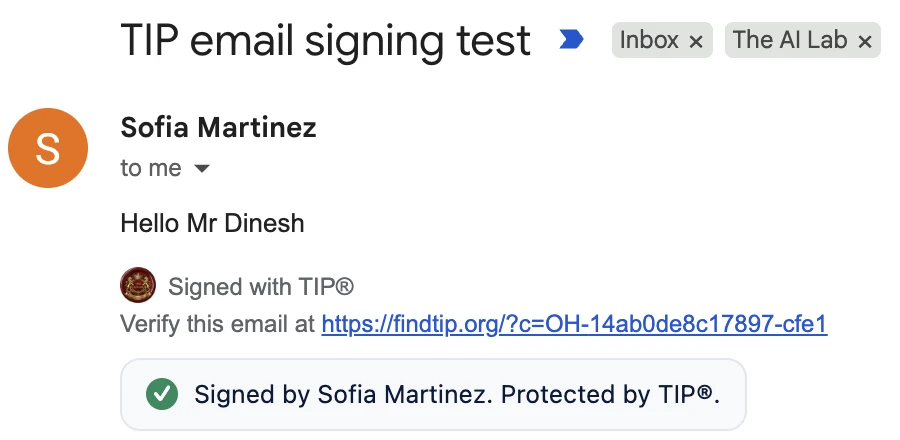
A short line goes under your message, "Signed with TIP" and a Verify link. People who have the free TIP extension see "Signed by" and your verified name right in their inbox. Everyone else can open the link.

A received email in Gmail ending with Signed with TIP, a Verify link, and a badge reading Signed by Sofia Martinez. Protected by TIP.

03

Anyone who received it can check it

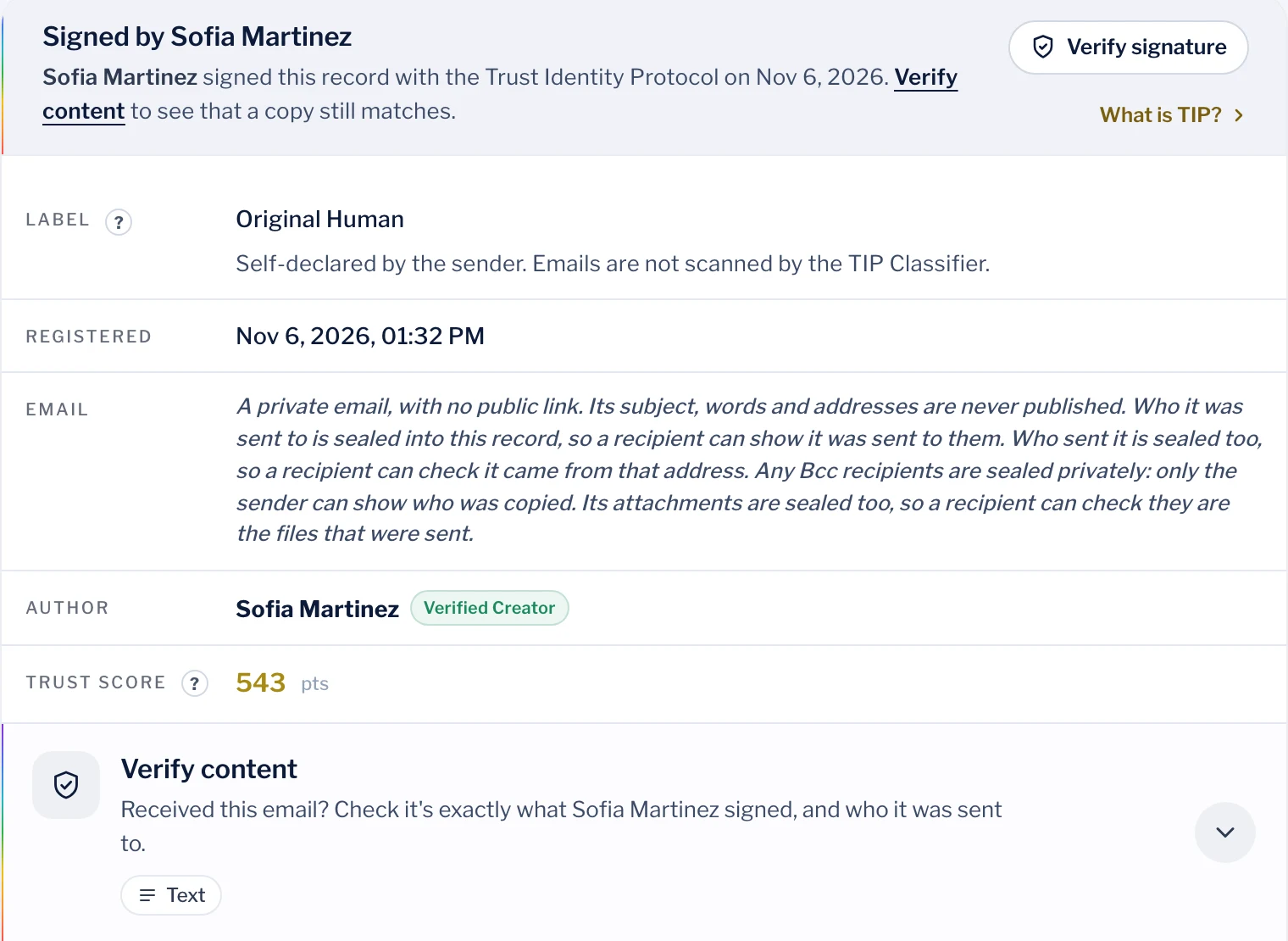
The Verify link opens the email's public record, which shows who signed it and when, but never its words or addresses. Verify content checks the subject, message, sender, recipients and attachments on the reader's own device. If anything was changed, it will not match.

The TIP record for a signed email, showing Signed by Sofia Martinez, the Original Human label, the registration time, a note that the email's subject, words and addresses are never published, and the Verify content panel

What TIP email signing does not do

  • It does not block, filter or quarantine mail. Keep SPF, DKIM, DMARC and your spam filter.
  • It only covers emails the sender chose to sign. An unsigned email is not proof of fraud, but in a company that signs every payment instruction, an unsigned one should be confirmed by phone.
  • It proves who signed an email and that it has not changed. It does not prove the email is true or that a request is wise.
  • It does not prove delivery. DKIM and mail server logs do that.
  • How an email was made, such as Original Human, is the sender's own statement. TIP never scans email text.

A rule your team and your customers can follow

“We sign every payment instruction and every change of bank details with TIP. If one arrives unsigned, treat it as unconfirmed and call us on a number you already have.” Finance teams, title companies, law firms, schools and city governments can publish this today. See how finance and payments teams stop business email compromise.

Documented cases of email impersonation

A selection of losses confirmed by court records, regulatory filings, police or the FBI. The method column matters, because each method defeats different defenses.

WhoLossWhat happenedMethodOutcome
Facebook and Google2013 to 2015More than $100 millionA man set up a company posing as Quanta Computer, a real supplier to both, and emailed fake invoices from accounts made to look like Quanta staff. CNBC, March 2019Lookalike company and addressesPleaded guilty to wire fraud in 2019 and agreed to forfeit about $49.7 million.
Ubiquiti Networks2015$46.7 millionThe finance department paid overseas accounts after what the company called employee impersonation and fraudulent requests from an outside entity. Ubiquiti, SEC Form 8-K, 2015Impersonation, method not disclosed$8.1 million recovered by the time of the SEC filing.
MacEwan University, Canada2017C$11.8 millionStaff changed a building contractor's bank details on request from someone posing as the contractor. The real contractor called days later asking to be paid. Global News, April 2018Vendor impersonationAbout C$10.9 million recovered by April 2018.
Arup, Hong Kong2024HK$200 million (about US$25.6 million)An employee was first contacted by a message from the "chief financial officer", then joined a video call in which every other participant was a deepfake, and made 15 transfers. CNN, May 2024Impersonation message, then a deepfake callArup confirmed the loss.
A commodity firm, Singapore2024US$42.3 millionAn email asking for a supplier payment to go to a new bank account came from an address spelled slightly differently from the supplier's real one. BleepingComputer, Aug. 2024Lookalike addressAbout $41 million recovered through INTERPOL and Timor-Leste police, with seven arrests.
Northern Territory Government, Australia2024A$3.58 millionAn agency received an email from a supposed contractor with a vendor form, new bank details and copied addresses for staff who did not exist. Police allege the sender registered a lookalike business. Australian Federal Police, 2025Vendor impersonation, lookalike businessA$3.57 million recovered. A man was charged in 2025.
A city government in Oregon2025More than $6 millionA business email compromise sent a wire to an account the FBI had already flagged in an earlier case. FBI IC3, 2025 Internet Crime ReportBusiness email compromiseThe bank recalled the wire after the FBI's earlier freeze on the same account.
A homebuyer in Missouri2025$1.3 millionA senior closing on a property received a compromised email from the "title company" with wire instructions to a fraudulent account. FBI IC3, 2025 Internet Crime ReportCompromised email in a real estate closingThe FBI froze the account, which held money from other victims too.
Dickinson Public Schools, North Dakota2026$4.92 millionCriminals impersonated a trusted vendor and redirected two payments from the district's building fund. GovTech, Feb. 2026Vendor impersonationLocal police, the FBI and the Department of Justice are investigating.

Email spoofing explained

What is email spoofing?

Email spoofing is sending an email that pretends to come from someone else. The simplest form forges the From address. Others use a lookalike domain with one letter changed, a familiar display name in front of an unrelated address, or a real account that was hacked. Email was designed in the 1980s without any check on the sender, so the From line is whatever the sender types. SPF, DKIM and DMARC were added later to let domains prove which servers may send for them, but they do not cover every trick.

What is the difference between email spoofing and phishing?

Spoofing is the disguise. Phishing is the goal. A phishing email tries to get you to click a link, open a file, hand over a password or send money, and it usually spoofs a sender you trust to do it. A spoofed email can also be used without a link at all, as in business email compromise, where the fake sender simply asks for a payment.

What is business email compromise (BEC)?

Business email compromise is fraud that uses email to impersonate a boss, a supplier, a lawyer or a title company and redirect a payment. The classic versions are a fake invoice, a request to change a supplier's bank details, an urgent transfer for a secret deal, and new wiring instructions just before a house closing. There is usually no malware. It works because the email looks routine and arrives at the right moment.

How much money is lost to business email compromise?

Americans reported $3,046,598,558 in business email compromise losses to the FBI in 2025, from 24,768 complaints. That made it the second-costliest crime type in the FBI's report, behind investment fraud, and up from $2.77 billion in 2024. Worldwide, the FBI counted $55.5 billion in exposed losses from October 2013 to December 2023, a figure that includes attempted losses. Reported numbers undercount, because many companies never report.

SourcesFBI IC3, 2025 Internet Crime ReportFBI IC3 PSA, Business Email Compromise, the $55 Billion Scam, Sept. 2024

How do scammers know when a payment is due?

Often they are already inside a mailbox. After stealing a password, a criminal can read real threads for weeks, learn who pays whom and when, and then send new bank details from the real account, or from a lookalike address, at exactly the right moment. Public information helps too. Press releases, contract awards, property listings and social media posts reveal suppliers, deals and closing dates.

Can AI write convincing phishing emails?

Yes. Chat tools write fluent, official-sounding email in any language, so poor spelling is no longer a reliable warning sign. In its 2025 report the FBI recorded 22,364 complaints that mentioned AI, with $893 million in losses, and said businesses reported more than $30 million lost to business email compromise involving AI. Because a well-written email proves nothing, the check has to be something a writer cannot fake, such as a call to a known number or a signature from a verified person.

SourcesFBI IC3, 2025 Internet Crime Report

Can a deepfake video call be part of an email scam?

Yes. In 2024 an employee at the engineering firm Arup in Hong Kong received a message from someone posing as the company's chief financial officer, then joined a video call in which every other participant was a deepfake, and made 15 transfers totaling HK$200 million, about US$25.6 million. The lesson is that no single channel, whether email, voice or video, should be enough to move money.

SourcesCNN, May 2024

Someone is using my email address

Can someone send an email from my address without hacking my account?

They can put your address in the From line, yes. That is spoofing, and it does not require your password. Whether the email gets through depends on your domain. Big providers such as Gmail and Outlook.com publish strong DMARC records, so forged mail from their addresses is usually rejected or sent to spam. A business domain without DMARC at p=reject is easy to forge. If replies and bounces you never sent are arriving, someone is likely spoofing you rather than using your account.

SourcesGoogle, emails that look like they came from youCISA, Binding Operational Directive 18-01

Someone is sending emails from my Gmail or Outlook account. What do I do?

If the messages appear in your own Sent folder, your account was taken over. Change your password from a clean device, turn on two-step verification, sign out of all other sessions, and check for forwarding rules, filters and changed recovery details that the attacker may have added to keep watching your mail. Then warn your contacts, especially anyone who might receive a payment request. If the messages are not in your Sent folder, it is spoofing, not a hacked account.

How do I stop someone from spoofing my email domain?

Publish SPF and DKIM records for every service that sends mail as your domain, then publish a DMARC record and move it from p=none to p=quarantine and finally p=reject while you watch the reports. At p=reject, receiving servers refuse forged mail that uses your exact domain. It does not stop lookalike domains, fake display names or a hacked mailbox, so pair it with payment rules and, for the messages that matter most, a signature from a verified person.

SourcesUK NCSC, email security and anti-spoofingCISA, Binding Operational Directive 18-01

Should I warn my contacts if my address is being spoofed?

Yes, if the fake emails ask for money, passwords or files. Tell people which address you really use, that you will never change payment details by email alone, and how to reach you by phone. If you sign your emails with TIP, tell them to look for your signature, because a forged email cannot carry it.

How to check an email

How do I know if an email is really from the person it says?

Look at the full address rather than the name, check your mail app for an authentication warning, and see where a reply would go. Those checks catch careless fakes. They cannot catch an email sent from a hacked real account. For anything involving money or sensitive data, confirm by calling the person on a number you already had. If the email is signed with TIP, open its Verify link. The record shows the signer's verified name, and Verify content confirms the email is exactly what they signed and was sent to you.

How can I check if an email is real or fake in Gmail?

A question mark in place of the sender's photo means Gmail could not confirm the message came from the domain it claims. The word via next to the sender means it was sent through a different domain. For detail, open the message, choose More, then Show original, and read the SPF, DKIM and DMARC lines. PASS on all three means the mail came from that domain's approved servers. It does not mean the sender is honest, because a lookalike domain or a hacked account also passes.

SourcesGoogle, Gmail sender authentication help

How do I check whether an email is real in Outlook?

Outlook can show a question mark in place of the sender's picture when it cannot verify the sender, and a safety tip when someone writes to you for the first time. To see the authentication results, open the message details or message source, where the SPF, DKIM and DMARC lines appear. As in Gmail, a pass shows the email came from that domain, not that the person behind it is who they say.

What is a lookalike domain?

A lookalike domain is a real, registered domain chosen to resemble another, such as rn in place of m, an added hyphen, a swapped letter, or .co in place of .com. Because the attacker owns it, they can set up SPF, DKIM and DMARC for it, so the email passes every check. In 2024 a Singapore commodity firm wired US$42.3 million after an email from an address spelled slightly differently from its supplier's. DMARC's own standard says it does not address visually similar domains.

SourcesRFC 7489, DMARC, sections 2.2 and 2.4BleepingComputer, Aug. 2024

Does a logo or a verified checkmark mean an email is safe?

Not on its own. A brand logo in the inbox, shown through a standard called BIMI, means the sending domain passed DMARC and registered its logo. It says nothing about lookalike domains or hacked accounts, and it identifies a company domain, not the person who wrote the message. A TIP signature identifies a verified person and lets you check the exact email.

My title company emailed new wiring instructions. Is it real?

Treat it as fake until you confirm it by phone, using a number from your closing documents or the company's official website, never one from the email. Changed wiring instructions are the most common real estate fraud. In 2025 a senior in Missouri was sent wire instructions for more than $1.3 million from a compromised title company email. Title companies, closing attorneys and agents who sign their instructions with TIP give buyers a check they can run in seconds.

SourcesFBI IC3, 2025 Internet Crime Report

How do I verify a vendor's new bank account?

Never change bank details on the strength of an email. Call the vendor on a number already in your records, ask for someone you know, and confirm the new details out loud. Require a second person to approve the change, and pay a small test amount before a large one. Ask your key vendors to sign payment instructions with TIP, so a change of bank details from a lookalike domain or a hacked mailbox fails the check.

SPF, DKIM, DMARC and signatures

What are SPF, DKIM and DMARC, in plain English?

SPF is a list, published by a domain, of the servers allowed to send its mail. DKIM is a signature that a domain's mail server adds to each message, so receivers can tell the message was not altered in transit. DMARC ties them to the From address people see, and tells receivers what to do when a message fails, whether nothing, spam folder or reject. All three prove things about domains and servers. None of them identifies the person who wrote the email.

SourcesUK NCSC, email security and anti-spoofingRFC 7489, DMARC, sections 2.2 and 2.4

Can a spoofed email pass SPF and DKIM?

Yes, in two common ways. A criminal who registers a lookalike domain sets up SPF and DKIM for it, so every message passes. A criminal who takes over a real mailbox sends through the real server, so every message passes there too. Passing authentication tells you which domain sent the email, not whether the person behind it is who they claim.

Do S/MIME or PGP signatures prove who sent an email?

They prove a message came from whoever holds a particular key or certificate, and they can encrypt mail. Both need certificates or keys issued and exchanged in advance, and both need compatible software on each side, which is why few people use them in everyday webmail. TIP takes a different route. A person verifies their identity once with an accredited Verification Provider, signs inside the webmail they already use, and recipients need nothing but a link to check.

What did Gmail, Yahoo and Microsoft change for email senders?

From February 2024, Gmail and Yahoo required every sender to authenticate with SPF or DKIM and required bulk senders, more than 5,000 messages a day to Gmail, to publish DMARC, align their From domain and offer one-click unsubscribe. Microsoft applied similar rules to Outlook.com from May 5, 2025 for domains sending more than 5,000 messages a day. The rules make forged bulk mail harder. They do not address lookalike domains or hacked accounts.

SourcesGoogle, email sender guidelinesYahoo, sender best practicesMicrosoft, Outlook requirements for high-volume senders, 2025

If you already sent money

What should I do if I sent money after a spoofed email?

Call your bank immediately, tell it the transfer was fraud, and ask it to recall the payment and contact the receiving bank. Then report it. In the United States, file at ic3.gov with the full transaction details, whatever the amount. Elsewhere, report to your national police cybercrime service. Keep the email, do not delete anything, and warn the real person or company whose name was used.

SourcesFBI IC3, 2025 Internet Crime Report

Can a bank reverse a wire transfer sent to a scammer?

Sometimes, if you act within hours. Through its Financial Fraud Kill Chain, the FBI froze $679 million in 2025, 58% of the money at risk in the 3,900 cases it pursued. In one 2025 case, homebuyers' $449,000 closing wire was still on hold in full when the FBI asked for a freeze. Every hour lowers the chance, because criminals move money on quickly.

SourcesFBI IC3, 2025 Internet Crime Report

How do I report business email compromise?

Tell your bank first, because it can try to stop the money. In the United States, then file a complaint with the FBI's Internet Crime Complaint Center at ic3.gov. In other countries, use the national cybercrime reporting service run by the police. Report even small or failed attempts, because the same receiving accounts are often used against many victims.

SourcesFBI IC3, 2025 Internet Crime Report

Signing email with TIP

How can I prove an email really came from me?

Sign it with the Trust Identity Protocol (TIP) by The AI Lab. With the free TIP browser extension and a TIP-ID, you press Sign with TIP next to Send. Your device signs the email after a fresh face or fingerprint check, and a Verify link goes under your message. Anyone who received it can open the link, see your verified name, and check that the email is exactly what you signed and was sent to them.

What is TIP email signing?

It is a way for a verified person to sign an email so the people who receive it can check who signed it, that it was sent to them, and that nothing was changed. The sender holds a TIP-ID, issued once after an ID and live face check by an accredited Verification Provider. Each email is signed on the sender's own device with ML-DSA-65, the post-quantum signature standard NIST published as FIPS 204, and recorded on the TIP network. A signed email is a Verifiable Asset with its own CTID.

SourcesNIST, FIPS 204

How does the recipient check a signed email? Do they need anything?

They need nothing but the link. Opening the Verify link shows the record, with who signed it, when, and how the sender says it was made. Verify content on that page checks the subject, message, From address, To and Cc list and attachments against what was signed, on the reader's own device, without uploading anything. Recipients who install the free TIP extension see "Signed by" and the sender's verified name directly in Gmail and the other supported webmail.

Does TIP read or store my emails?

No. The public record holds a fingerprint of the email, never its words. Its subject, message and addresses are never published. In TIP 2.9.74 and later, the subject and message never leave your device at all. Who it was sent to and who sent it are sealed into the record, so only someone who already has the email can check them. Bcc recipients are sealed privately, so only the sender can show who was copied. Emails are never scanned by the TIP Classifier.

Can someone copy the TIP line into a fake email?

They can paste it, but it will not pass. The record holds a fingerprint of the original subject and message, so a different email fails Verify content, and the TIP extension reports it as changed. The link only ever proves the email it was created for.

What if a criminal re-sends a real signed email to someone else?

The recipient check fails. The record seals the list of people the email was signed for. When the same email is re-sent to a new address, its To and Cc no longer match that sealed list, so Verify content does not confirm it. A genuine signed message cannot quietly be reused against a different victim.

Can a hacker who gets into my mailbox sign emails as me?

No. A stolen email password gives access to your mailbox, not to your TIP key. Your key stays on your own device, and every signature needs a fresh face or fingerprint check there. There is no unlock window and no saved session that skips it. An email the hacker sends from your account will carry no valid signature, which is exactly what your contacts should look for.

Does TIP replace SPF, DKIM, DMARC or my spam filter?

No. Keep all of them. They protect domains and filter mail at scale, and TIP does not block or filter anything. TIP adds what they cannot, a check that a verified person signed this exact email for these recipients. That covers the lookalike domains, fake display names and hacked mailboxes that pass domain authentication.

Which email services and browsers does TIP email signing work with?

Signing works in Gmail, Outlook, Yahoo Mail, AOL Mail, iCloud Mail, Proton Mail, Zoho Mail and Fastmail, through the free TIP browser extension for Chrome, Firefox, Safari, Arc and Brave. You can also write and sign an email in the extension's Email form and send it from your usual mail. Checking a signed email works in any browser on any device, through its Verify link.

How should a business use TIP against payment fraud?

Make it a rule people can follow. Executives, finance staff, title companies and law firms sign every payment instruction and every change of bank details with TIP, and tell customers and vendors to treat any unsigned one as unconfirmed and call. Keep callback checks and dual approval for large transfers. The signature does not replace those controls. It gives them a check that a lookalike domain or a hacked mailbox cannot pass.

What does TIP email signing cost?

Checking a signed email is free for everyone, with no account. Signing is free for individuals, nonprofits, schools and universities, government bodies, journalism organizations for editorial use and businesses under USD 100,000 in annual revenue. Larger businesses use a published commercial license, with every tier listed at theailab.org/tip-license.


Glossary

Email spoofing
Sending an email that pretends to come from someone else, by forging the From address, using a lookalike domain or a familiar display name, or sending from a hacked account.
Business email compromise (BEC)
Fraud that impersonates a boss, supplier, lawyer or title company by email to redirect a payment.
Lookalike domain
A registered domain chosen to resemble a real one, such as a single changed letter. It can pass SPF, DKIM and DMARC because the attacker owns it.
Display name spoofing
Putting a trusted person's name in front of an unrelated email address, so the inbox shows the name.
SPF
Sender Policy Framework. A domain's published list of the servers allowed to send its mail (RFC 7208).
DKIM
DomainKeys Identified Mail. A signature a domain's mail server adds to each message so receivers can check it was not altered (RFC 6376).
DMARC
Domain-based Message Authentication, Reporting and Conformance. Ties SPF and DKIM to the visible From domain and tells receivers to accept, quarantine or reject failures (RFC 7489).
BIMI
Brand Indicators for Message Identification. Shows a brand's logo for mail that passes DMARC. It identifies a domain, not a person.
S/MIME and PGP
Standards for signing and encrypting email with keys or certificates exchanged in advance.
TIP-ID
A verified identity on the Trust Identity Protocol, issued once after an ID and live face check by an accredited Verification Provider.
CTID
Content TIP ID. The permanent identifier of a signed record on the TIP network. A signed email has one.
Verifiable Asset
A Verifiable Asset is any piece of digital content that carries a CTID (Content TIP ID): a permanent, signed public record of who made it, when, how it was made, and a fingerprint that shows whether it has changed since.

All sources, checked November 6, 2026

Sign the emails that matter

Checking a signed email is free for everyone. Signing is free for individual people, nonprofits, educators, governments, journalists and businesses under USD 100,000 in revenue.

Read the standard, the Trust Identity Protocol, and how it handles deepfakes and content authenticity.